Eagle Eyes Analog Calibration Console
Engineering a tactile, physical electrophysiological interface to bridge erratic EOG biosignals with assistive computing systems.
The Challenge
The EagleEyes hardware box translates micro-electrical electro-oculographic (EOG) potentials from face electrodes into real-time mouse coordinate movements. Because raw human biological signals are inherently volatile, the system demands precise analog signal balancing and manual re-centering during operation.
The core barrier lay in environmental friction: parents, educators, and clinicians were often overwhelmed by complex medical gear, causing critical input adjustments to be erratic, stressful, and error-prone.
The Objective: Formulate an intuitive, physically bulletproof hardware control panel. The physical interface must cleanly isolate horizontal and vertical signal vectors, providing distinct tactile affordances that allow non-technical caregivers to calibrate inputs flawlessly under high-stress domestic and clinical conditions.
Phase 1: Discovery & Research
To understand the clinical landscape and our operators, the project kicked off with physical ergonomic mapping and technical baseline audits.
Anatomy-to-Hardware Benchmarking
I audited traditional medical amplification interfaces. This analysis revealed a common pitfall: most diagnostic gear mapped adjustment channels sequentially by plug numbering rather than linking knobs to corresponding visual vectors, creating massive operational friction for parents.
Operator Persona Development
We needed to serve a highly diverse support environment. I synthesized our user research into matrixed personas to capture unique environment limits, stress thresholds, and technical comfort levels:
The Home Caregiver
"I just want to re-center my child's tracking baseline without accidentally modifying the master electronic gain spikes."
The Special Ed Instructor
"Classroom setup needs to be immediate. I don't have hours to trace electrode lines when a student loses signal track."
The Clinical Tech Specialist
"I need an unpowered, passive way to rapidly verify physical switch setups during electrical baseline calibrations."
Phase 2: Information Architecture & Component Engineering
To condense intricate biological processing variables into an intuitive control interface, I engineered a spatial physical topology based directly on human ocular anatomy.
The Tri-Zone Spatial Control Schema
I translated raw signal tracking coordinates into a balanced control panel layout divided into three clear anatomical modules:
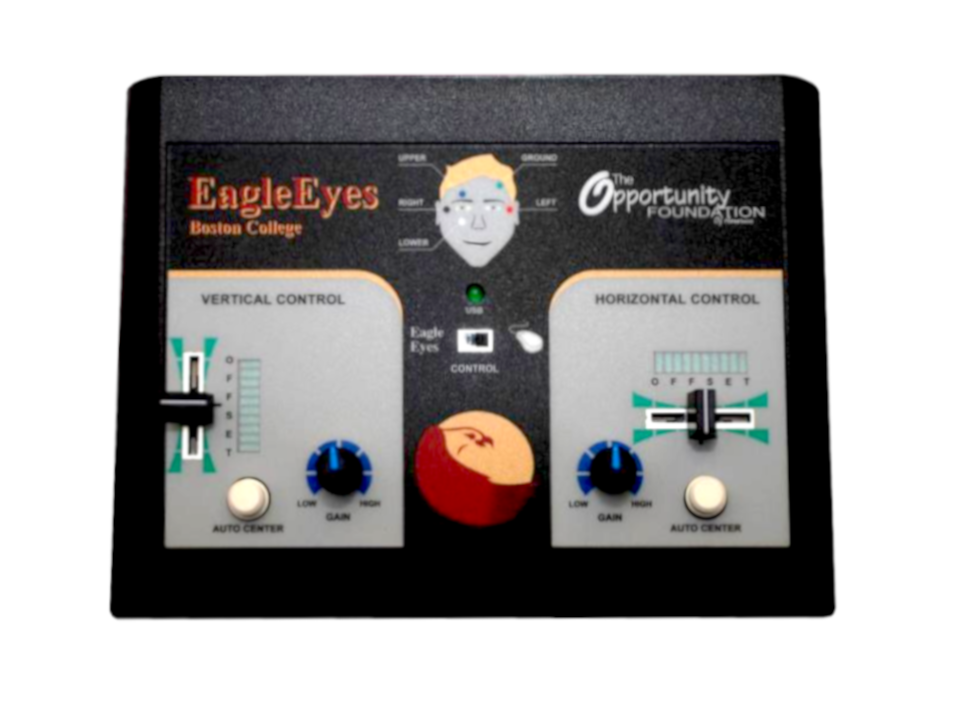
- Anatomical Center Infographic: Designed a stylized, high-contrast human face silhouette graphic directly between primary branding markers. This provides immediate semantic routing clues for face electrode placement (upper, lower, left, right, and ground) anchored by a center diagnostic LED.
- Vertical X-Axis Vector Module: Placed a dedicated linear slider potentiometer on the left panel wing, detailed with stepping scale markings (0–7). The vertical adjustment direction directly mirrors the up/down channel calibration path.
- Horizontal Y-Axis Vector Module: Placed a matching slider on the right panel wing tracking along a lateral layout axis. Left and right physical shifts map directly to horizontal eye coordination offsets.
Engineering the Physical Console Interface
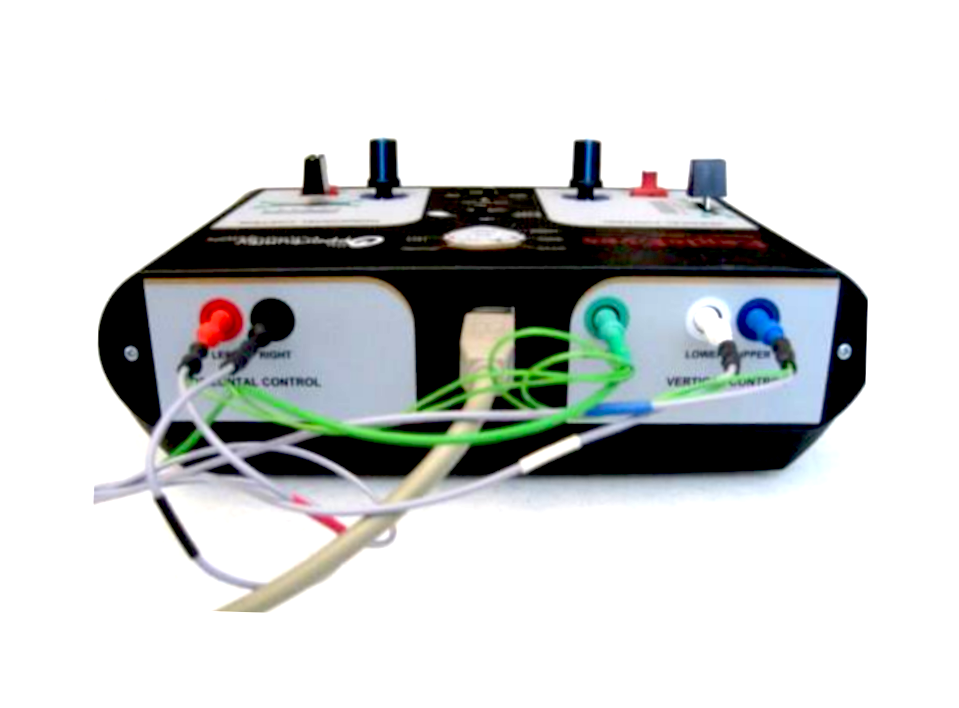
The console layout maps hardware inputs directly to physiological actions, simplifying operational mental models into step-by-step visual regions.
Phase 3: Balancing the Triad Constraints
A beautiful interface is meaningless if it isn't usable, universally accessible, or technically feasible. I managed these overlapping priorities by engineering an interactive system that balanced user satisfaction against strict university compliance rules and engineering resource limitations.
Form Follows Physiology
Initial testing cohorts revealed that operators struggled to differentiate complex coordinate paths under high stress, leading to accidental alignment slips.
- Angled console face increases visibility on low classroom tables.
- Engineered generous physical separation between sliders to eliminate cross-input drift.
- Utilized heavy rotational friction dials to prevent accidental manual brushing errors.
Designing for Universal Inclusivity
In assistive environments, human accessibility is absolute. Controls must communicate their function transparently to reduce setup errors and operational panic.
- Audited console graphic colors against high-contrast guidelines to preserve visibility in low classroom lighting.
- Shaped components systematically based on behavioral functions so parameters can be tracked purely by touch.
- Used bold border mappings to cleanly separate tracking segments from diagnostic feedback arrays.
Designing for Mechanical Tooling & Clearances
A physical interface overlay must endure heavy clinical use while aligning perfectly over physical electronics, requiring strict adherence to manufacturing print tolerances and tool punch-out dimensions.
- Engineered explicit structural clearance margins around all mechanical buttons and sliders to account for cutting-die stamping shifts.
- Designed high-contrast, bold infographic lines that meet minimum silk-screen ink bleeding parameters, preventing blurring during print production.
- Mapped graphic elements strictly to the physical enclosure specs, ensuring a flawless hardware layout fit during final assembly.
The Outcome & Impact
By moving complex biological tuning components into a clean, human-centered hardware cockpit, we successfully lowered the onboarding barriers of assistive EOG technologies. The completed console structure scaled smoothly from clinical laboratories to everyday home and classroom deployments.
Zero-Blind Calibration
Empowered home operators and instructors to balance tracking coordinates effortlessly without ever removing their primary visual focus from the paralyzed learner's facial movements.
Cognitive Defensiveness
Completely removed manual setup error loops and signature calibration delays by mapping controls cleanly to human anatomy. Color-coded regions eliminated configuration anxiety under pressure.
Long-Term Build Lift
Post-deployment hardware feedback detailed an immediate lifting of platform trust and success rates. Universal, accessible design practices directly unlocked cognitive validation tracks for deeply vulnerable patient cohorts.